
| Home | Forums | What's new | Resources | |
| CD-ROM File System. |
| Trenton net - Jun 21, 2002 |
 |
Trenton net | Jun 21, 2002 | |
| Hey, I was wondering if someone knew how to use a program like ISO Buster or something similar to strip/delete the File System structure out of an BIN Image? Thanks! | |||
 |
Cecilia Chen | Jun 21, 2002 | |
| I thought Iso Buster only read files, not modifyed them. Maybe some other program? | |||
 |
sizone | Jun 22, 2002 | ||
yeah, that wouldn't have been as much fun as wasting my last 3 cds and a few hours of my life though | ||||
|
Trenton net | Jun 23, 2002 | |
| Well, thanks, but I want to know how to Delete the file structure out of a bin. As in, remove it or blank it out with zeros. | |||
 |
ExCyber | Jun 23, 2002 | |
| I'm really not in the mood to read through it at the moment, but information on where stuff sits in an ISO 9660 filesystem can be found here.... | |||
 |
MasterAkumaMatata | Jun 24, 2002 | ||
In that case, use a hex editor like WinHex to do it. All you need to do is find out where the file system starts and ends. Looking at some MODE1 ISOs, I find that the file system starts at the 20th sector (i.e., offset A000 if 2048 sector size, offset B7C0 for 2352 sector size). Following the procedure I wrote above and taking the Shining Force III Scenario 3 example again, I know that the file system ends before LBA 47, so I calculate the ending offset to be (47 x 2,048) - 1 = 96,255 = 177FF (use Windows calculator to convert decimal to hex in Scientific mode). If the sector size was 2352, then my calculation to find the ending offset would be (47 x 2,352) - 1 = 110,543 = 1AFCF. Once I know the offsets for the start and end of the file system block, I can Edit > Define Block... in WinHex and type in the offset values for Beginning and End and that both are with respect to "Beginning of file". Then Edit > Fill Block... to fill the block with 00 hex values: 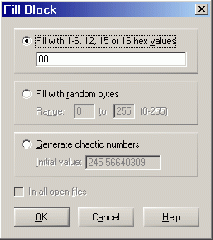 Hit OK and you should see the file system block all blanked out with zeros. Now save and close out of your hex editor. One last step if you're working with a 2352 sector sized BIN image would be to "Rebuild Sector Fields..." using CDmage so that the overhead sector fields... (e.g., ECC and EDC) are updated to reflect the 00 hex values. You wouldn't have to perform the last step if you're working with a 2048 sector sized BIN image because there wouldn't be any overhead data to update. | ||||
|
Trenton net | Jun 24, 2002 | |
| If the file system doesn't start at 0, how did you calculate the starting offset? I suppose there isn't a simple way to tell the start and end of the file system of a BIN file? If so, I could just write a simple app to detect the start and end of the FS and blank it out automaticly without the need for calculating it. | |||
|
MasterAkumaMatata | Jun 24, 2002 | ||
I know it doesn't start at 0 because the first 16 sectors contain the boot code (IP.BIN if you will). The next sector contains the volume info: 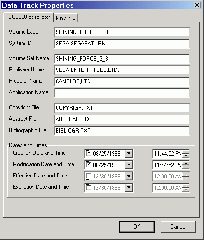 Past that you'll most likely see blank values in a hex editor (unless you have Joliet volume info or something which would take up another sector), until you reach the file system area, that is where you'll start seeing actual file names separate by what seems to be random hex values. Taking the hex code of the offset of where that begins and converting to decimal, followed by dividing by the sector size, I get exactly 20: (hex) (dec) A000 = 40,960 ==> 40,960 / 2048 = 20 BC70 = 47,040 ==> 47,040 / 2352 = 20 It was probability a nice coincidence that I happened to pick an offset that divided evenly with the sector size,  If I didn't get an even 20, I would've probably rounded it to about that number or so. After testing on some other BIN image files, I came to a conclusion that 20 was the number. If I didn't get an even 20, I would've probably rounded it to about that number or so. After testing on some other BIN image files, I came to a conclusion that 20 was the number. | ||||
 |
antime | Jun 24, 2002 | |
| This... document might help you determine what those "random hex values" actually mean. | |||