Aaahahaha!  I didn't think I'd find it again, but here it is! I didn't think I'd find it again, but here it is!
Notice the document refers to US/JAP Saturns but has a link for PAL models at the very bottom 
| | | --------------------
--------------------
9.6 How can I install a language switch?
-------------------
--------------------
-
By far, Jerry Lynds & Kirk Patten have provided the most reliable method
for installing a language switch on your Saturn. This information only
pertains to Japanese and US systems however, and have not been confirmed
to work with PAL equipment.
-------------------
--------------------
--------------------
-------------
* For the modification of the Saturn, you will need:
* Phillips Screwdriver, Standard Size
* Phillips Screwdriver, Small
* Flatblade Screwdriver, Small
* Sidecutters
* Pencil Tipped 15 Watt Solder iron
* (1) DPDT Switch, Small
* ~8" 6 strand ribbon cable, or 6 pcs 8" wire
* Needlenose Pliers with Bent Tip
* X-Acto or other sharp knife
* Drill
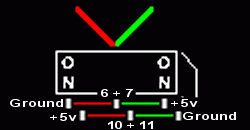
In its most basic sense the modification consists of hooking a DPDT
switch up across two pairs of two jumpers to allow you to alternate
between two jumper configurations conveniently. Currently, I am aware of
four versions of the Sega Saturn Hardware that are for sale. This
document details performing the modification for each of these versions
of hardware. There do exist other versions of this hardware (ex: the
White Saturn), but they do not differ signifigantly relating to the
modification.
___________
Disassembly
Before modifying any of the three hardware configurations, it is
necessary to completely disassemble your Sega Saturn unit. The jumpers
will be located on the main PC board, and in order to access them you
will have to remove this board from the unit. In all three versions of
the hardware, this is located at the very bottom of the case. I have
found it helpful to lay out the parts on a towel or some such to
facilitate easy re-assembly. Be careful when disconnecting wires and
ribbon cables, they are fragile. Note that on the newer versions of the
Saturn, you will have to lift the CD drive off its mounting posts, and
remove a small phillips screw holding the CD grounding strip to the
metal shielding. If you do not do this, you will be unable to lift the
drive, shield, or main PC board from the case. Take your time
disassembling the unit. There is nothing very difficult, but some
components are easily damaged, and it will be easier to re-assemble if
you take care to remember where the components are located. It is not
necessary to remove the battery from the PC board to perform the mod,
but it is a wise precaution. If you do remove the battery, your saved
data will all be lost.
______________
Wiring the Mod
The 6 posts of the DPDT switch will be referred to as A-F, as below. B
and E will be the center terminal designations in this document. An X
signifies that the connection point will not be used in the
modification. Simply connect the corresponding letters on the switch to
the corresponding letters on the main PC board for the version of your
hardware.
DPDT Switch
Left Right
A D
B E
C F
-------------------
--------------------
--------------------
-------------
Version 1
JP# LeftRight
JP11 F E
JP10 D X
JP7 A X
JP6 C B
This version of the mod is for the original version of the Saturn. This
hardware version will have the MPEG daughter board, and the power
connector will not have any notches in it. The jumpers are located in
one bank on the bottom of the main PC board.
There will be two small traces on the circuit board shorting JP6 and
JP11, or JP7 and JP10. You will have to physically cut these traces
before you wire for the switch to function properly. The common posts of
JP10 & JP11 and JP6 & JP7 are on the right side in both instances.
-------------------
--------------------
--------------------
-------------
Version 2
JP# LeftRight
JP11 X A
JP10 B C
JP# LeftRight JP# Left Right
JP6 D X JP7 F E
In this version the power cord is notched. This version was manufactured
from approximately 8/95 - 3/96. You will have to remove two small
components from either JP7 and JP10 or JP6 and JP11. They are
unimportant and serve merely to short the jumpers that establish the
world area in which your machine is designed to operate.
JP10 & JP11 are located on the top of the main motherboard near the
center in the configuration shown above. JP6 & JP7 are on the bottom in
a side by side configuration like in the table above. The common post
of JP6 & JP7 is on the right, while the common post of JP10 & JP11 is on
the left.
-------------------
--------------------
--------------------
-------------
Version 3
JP# LeftRight
JP6 X A
JP7 B C
JP# LeftRight
JP11 D X
JP10 F E
In this version the power cord is notched. This version was manufactured
from around 3/96 - 7/96. You will have to remove two small components
from either JP7 and JP10 or JP6 and JP11. They are unimportant and serve
merely to short the jumpers that establish the world area in which your
machine is designed to operate.
In this version of the hardware, the jumpers are all grouped together on
the bottom of the board. The common post of JP6 & JP7 is on the left,
while JP10 & JP11 is on the right.
-------------------
--------------------
--------------------
-------------
Version 4
JP# LeftRight JP# Left Right
JP6 A X JP7 B C
JP# LeftRight JP# Left Right
JP10 F E JP11 X D
In this version the power cord is notched. This version was manufactured
starting 7/96, it is the second version that does not have a drive light.
You will have to remove two small components from either JP7 and JP10 or
JP6 and JP11. They are unimportant and serve merely to short the jumpers
that establish the world area in which your machine is designed to
operate.
In this version of the hardware, the jumpers are all grouped together on
the bottom right of the board. The common post of JP6 & JP7 is on the
right, while JP10 & JP11 is on the left.
___________
Re-assembly
In all four versions, you should be able to feed the connecting wires
from under the main PC board to a location near the reset switch. You
should be able to re-assemble the machine with the top not screwed down
and the switch hanging on the outside to test it. When you are ready to
finalize the mod, there is ample room to drill a hole in the top of the
case to the right of the reset switch. In all four versions of the
hardware, there should be room inside the case for a regular microswitch
in this area.
________________
Additional Notes
Again, if you do not understand part of this document, then it is not a
good idea to utilize any of the information contained herein. I do not
intend to answer questions about this from now until the end of time, so
only do this mod if you understand this document as it stands. I will
not answer questions about this unless I feel like it.
You should not have to cut or change any part of your machine except the
jumpers, and drilling a hole for the switch. You can even avoid drilling
the hole to mount the switch if you make the connecting wires long
enough to feed the switch out the battery access door in the rear of the
unit.
[John's note:] You can also cut a square hole in the battery door and
mount the switch there. The plastic is very soft and easy to work with
and it holds the switch nicely.
---
On the other hand, U.K. Saturn owners may find Tony Ross's guide more
informative, as he takes PAL modifications into consideration at the
same time. You can view that particular proceedure here:
http://www.trsoft.demon.co.uk/satmod.htm... |
|



 Which is good because I can't even begin to think where that one guide I had came from.


 I didn't think I'd find it again, but here it is!