
| Home | Forums | What's new | Resources | |
| Restoring Save Data to Saturn - Can't Get Any Utilities Working |
| Tracker_TD - Jan 6, 2023 |
 |
dibz | Jan 6, 2023 | |
| Just a random thought, but is there a problem with the saturn itself? I'd test saving a game on the saturn itself, normally, if you haven't already. | |||
 |
Tracker_TD | Jan 6, 2023 | ||||
Yeah, that seems to work fine. Booted up Daytona USA, fiddled with the options and hard-reset the console - works fine. It's just getting the applications to actually load that's the problem - I might be doing something wrong with WinISO for the Save Data Copier, but I don't know why it can't detect anything from even the included stuff when burned to the CD-R. Save Data Manager I also have no idea about, my best guess is my version of Pseudo is too old.
| ||||||


 |
privateye | Jan 6, 2023 | ||
| Have you tried different burning software like ImgBurn...? The fact that the pre-included save files are not showing up in Save Game Copier makes me think that WinISO is making coasters. I recommend burning at the lowest speed that your disc burner supports (for most modern drives, that 10x). Also, SaveRepack utility provides a convenient way to inject your save files into Save Data Manager: https://segaxtreme.net/threads/sega-saturn-27th-an...
Since these carts are unshielded, they tend to cause issues on certain Saturn hardware revisions: PPCenter :: Pseudo Saturn Kai Compatibility List... I recommend applying shielding, if possible: PPCenter :: Pseudo Saturn Kai Compatibility List... I'm not saying that this is the cause of your issues, but it's something to keep in mind. | ||||
|
Tracker_TD | Jan 7, 2023 | ||||
They were renamed using the 8.3 format, yes. I think it must be something I did wrong when editing the ISO in WinISO, but I'm not sure what. I uploaded the files to drive, although these are the versions before I converted the filenames to 8.3. So when I tried using the copier with Burning Rangers for example, I used BRANGERS.BUP.
I did manage to get the Save Data Manager working last night, but extremely inconsistently. Most of the time it'd just hang when trying to access the files on the disc, despite loading everything else totally fine. I've got a Fenrir ordered, so I guess that'll tell me if it's just a laser issue, but it's not something I've run into with any other game or homebrew. | ||||||

 |
slinga | Jan 7, 2023 | |
The .BUP files look correct to me. I verified they load in Yabause: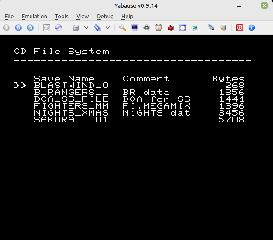 So could it be a compatibility issue with Psuedo Saturn Kate Lite? An issue with how you are burning the ISO? I made a build of SGC (with only your saves) with additional logging. Please let me know if you see any error messages. | |||
|
Tracker_TD | Jan 8, 2023 | |
| Using that ISO allows me to use the internal memory viewer, however the CD filesystem still appears blank. (using my actual Saturn, burned using IMGBurn). Works fine in Yabause, as you said. No error codes though, sorry. Unless there's a step I'm missing - I simply let the disc boot and check the CD Filesystem option, I don't know if there's anything extra I need to do before that.
| |||
|
slinga | Jan 8, 2023 | |
| Weird. I can try and dig up my Pseudo Saturn cart to see if I can repro. If you are interested in debugging further: 1) Are you comfortable doing the swap trick? Basically run the game without using the Psuedo Saturn cart. 2) I believe there are different loading options in Pseudo Saturn? Can you try different options? | |||
|
Tracker_TD | Feb 7, 2023 | |
| Sorry for the radio silence, but I recently nabbed a Fenrir Duo and now the utilties seem to be working fine - so I'm guessing the Psuedo cart was the culprit after all. | |||
 |
NoAffinity | Apr 6, 2024 | |
Hey @slinga... - I've migrated from the SGEX thread to here now. I'm at the final steps, having a similar problem to what Tracker_TD was reporting. I compiled a SGC iso using Jo Engine. I tested it in a couple emulators, running the Jo Engine scripts, and my Castlevania SOTN save game shows up no problem from the booted .iso.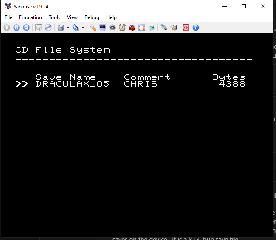 I then burned the iso and boot it on my saturn. The disc boots fine, but when going into CD File System, it reports "Found 0 saves on the device. It is a 8+3 .bup save file. I also tested the SGC compiled iso in Yabause, and transferred the save file into that environment. I then loaded a Castlevania SOTN iso in Yabause and was able to successfully load and play from the save, within the game, within Yabause. 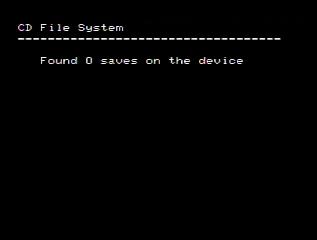 As a final sanity check, I loaded the burned CD into Yabause, and Yabause sees the save file on the disk just fine. 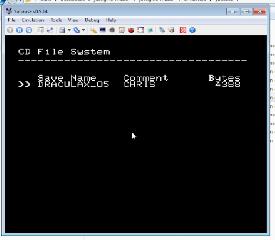 The save file is attached, as well, if needed for further investigation. :edit: so here's something interesting. On a hunch, I booted the burned disk on my other saturn, which has one of the older mods allowing play of backup disks, and region free bios. This is the system that the save file came from. It boots the disk and sees the save file on the disk. I'm trying to swap it to my other saturn for various reasons, but the main hinderance on all of this is the saturn I'm trying to swap the save file on to has a flashed AR plus cart hard-wired in where the cart slot once was; the cart slot was horribly failed, so I decided to just permanently remedy it's failure. So I can't just insert a AR cart (and I do have others), and transfer the file because there is no cart slot. And for whatever reason, that Saturn doesn't see the save file on the burned disk. | |||
|
slinga | Apr 7, 2024 | |
| Unfortunately I don't know what advice to give you. Your save looks correct and the ISO you made works on an emulator and boots on hardware. | |||
|
slinga | Apr 7, 2024 | |
| What happens when you try the burned CD (not ISO) in an emulator? I'm assuming it will work? That should rule out a bad burn right? | |||
|
NoAffinity | Apr 7, 2024 | |
| I mentioned that above. The burned cd works in yabause too. I think it's a laser issue. I even had a spare laser and swapped that in but that thing didnt work at all. At any rate, I ended up ordering a fenrir cuz i think it's time to go ODE in this ol saturn. All that is to say, none of this is a reflection on SGC. It worked like its supposed to. | |||