
HomeForumsWhat's newResources 
 
 
USB dev cart project
antime - Mar 24, 2012

 Prev  1  ...  5  6  7  8  Next 

   razor85 Dec 23, 2018 

  antime said:

I managed to compile it, make some changes and run the disk. The application doesn't even write the first byte of data. I'll run a check on the hardware joints again. I truly suspect of the memory chips now, but they are a pain to desolder. Anyway, will do it Thanks for the help!

   cafe-alpha Dec 26, 2018 
How is it going now, @razor85... ? The soldering of your USB dev cart looks good, and is better than mine So rather than desoldering the flash ROM chip, I would recommend you to verify the value of vendor/device IDs displayed by flasher utility : for example, if you see something else than FFFF/FFFF, then it's probably a cartridge connection problem.

BTW, black screen without SEGA logo on startup sometimes happens here too, and is usually caused by affinity problem between connector and cartridge. Right-justifying the cartridge before inserting it in its slot usually solves this problem here.

I started with similar problems too, so please keep persevering !
(In my stock, I still have a little stock of SMD "0603 metric" passive components smaller than the fragment of a breadcrumb from the time I soldered my first USB dev cart ! And I still own this first USB dev cart, because it didn't worked at all )

   razor85 Dec 28, 2018 
Hey, thanks for the heads up. I tried to move the cartridge many times, but no success. I also desoldered the memory chips and got other ones into place, and at first it identified correctly, but once it started flashing, it froze (I waited a lot). On the next boot, no device recognized (just got vendor id FFFF). I guess I'm out of luck? I know these chips can be reprogrammed over and over, so maybe it's another component?

   razor85 Dec 28, 2018 

  cafe-alpha said:


Wow, you are right! Upon moving the cartridge now, I get different ID's all the time. Maybe I need to find the perfect position?

   razor85 Dec 28, 2018 
IT flashed!!!!!!!! ONE!!!!!

It boots now, I followed the guid on PPCenter to get SatLink up and running, but when I try to upload minesweeper, I get stuck on:

https://imgur.com/a/63WDAdN


EDIT: The log says:
Code:
  
[12:10:37:531]20>SatCom debugger Ver.1.5.60 [Build Jan 19 2017, 05:07:26] [12:10:37:532]20>Usage: SatLink.exe <ini_file> [<commands>] [12:10:37:533]20> [12:10:37:534]20>Available command-line parameters are: [12:10:37:536]20> -logsettings <file> Open log settings file. [12:10:37:536]20> -dev parlink Open parallel port based device. [12:10:37:537]20> -dev usbdl Open USB Data Link device. [12:10:37:538]20> -dev usbdc Open USB dev cart device. [12:10:37:539]20> -dev ylink Open Yabause Link. [12:10:37:540]20> -s <parameter> <value> Set parameter to the specified value. [12:10:37:541]20> -loginfos Log help and commands given to program. [12:10:37:542]20>Basic commands: [12:10:37:544]20> -l <file> <addr> Load file to address [12:10:37:545]20> -x <file> <addr> Load file and JSR to load address [12:10:37:547]20> -xx <file> <addr> <flags> Load file, soft reset and JSR to load address [12:10:37:550]20> -memset <addr> <val> <len> Set memory area to specified 8-bit value. [12:10:37:553]20> -d <file> <addr> <size> Dump data to file [12:10:37:555]20>Soft reset flags used in -xx function: [12:10:37:556]20> Bit 0 : if set, reset High work RAM. [12:10:37:560]20> Bit 1 : if set, reset Low work RAM. [12:10:37:561]20> Bit16 : if set, reset VDP1 registers. [12:10:37:563]20> Bit17 : if set, reset VDP1 RAM. [12:10:37:565]20> Bit18 : if set, reset VDP2 registers. [12:10:37:566]20> Bit19 : if set, reset VDP2 RAM. [12:10:37:568]20> Example : 0xFFFFFFFE : reset everything except High work RAM. [12:10:37:569]20>Some shortcuts for the above commands: [12:10:37:571]20> -db <file> Dump BIOS (assume 512K) [12:10:37:572]20> -df <file> Dump cheat cartridge firmware (assume 256K) [12:10:37:575]20> -bs <file> Save battery backed RAM to file [12:10:37:576]20> -bl <file> Load battery backed RAM from file (must be 32K) [12:10:37:578]20> -target_info Display target informations. [12:10:37:579]20> -vdp1view Get VPD1 framebuffer snapshot. [12:10:37:581]20> -showlog Show Log Window. [12:10:37:583]20> -gui_set Change Main Form setting (Same keywords as in SatLink.ini). [12:10:37:585]20> -exit Exit this application. [12:10:37:586]20> [12:10:37:588]20>Based on Saturn PAR utility by Charles MacDonald (http://cgfm2.emuviews.com) [12:10:37:590]20>Based on code by Bart Trzynadlowski, James Forshaw and Charles MacDonald. [12:11:40:824]20>[PT]SC->OPEN (usb_dev_cart.ini) [12:11:40:826]20>Set log setting from file: log_settings.ini [12:11:40:827]20>SatCom debugger Ver.1.5.60 [Build Jan 19 2017, 05:07:26] [12:11:40:829]20>Usage: SatLink.exe <ini_file> [<commands>] [12:11:40:830]20> [12:11:40:833]20>Available command-line parameters are: [12:11:40:834]20> -logsettings <file> Open log settings file. [12:11:40:836]20> -dev parlink Open parallel port based device. [12:11:40:837]20> -dev usbdl Open USB Data Link device. [12:11:40:839]20> -dev usbdc Open USB dev cart device. [12:11:40:840]20> -dev ylink Open Yabause Link. [12:11:40:843]20> -s <parameter> <value> Set parameter to the specified value. [12:11:40:844]20> -loginfos Log help and commands given to program. [12:11:40:846]20>Basic commands: [12:11:40:847]20> -l <file> <addr> Load file to address [12:11:40:849]20> -x <file> <addr> Load file and JSR to load address [12:11:40:850]20> -xx <file> <addr> <flags> Load file, soft reset and JSR to load address [12:11:40:852]20> -memset <addr> <val> <len> Set memory area to specified 8-bit value. [12:11:40:853]20> -d <file> <addr> <size> Dump data to file [12:11:40:855]20>Soft reset flags used in -xx function: [12:11:40:857]20> Bit 0 : if set, reset High work RAM. [12:11:40:858]20> Bit 1 : if set, reset Low work RAM. [12:11:40:860]20> Bit16 : if set, reset VDP1 registers. [12:11:40:861]20> Bit17 : if set, reset VDP1 RAM. [12:11:40:863]20> Bit18 : if set, reset VDP2 registers. [12:11:40:864]20> Bit19 : if set, reset VDP2 RAM. [12:11:40:867]20> Example : 0xFFFFFFFE : reset everything except High work RAM. [12:11:40:868]20>Some shortcuts for the above commands: [12:11:40:870]20> -db <file> Dump BIOS (assume 512K) [12:11:40:871]20> -df <file> Dump cheat cartridge firmware (assume 256K) [12:11:40:873]20> -bs <file> Save battery backed RAM to file [12:11:40:875]20> -bl <file> Load battery backed RAM from file (must be 32K) [12:11:40:876]20> -target_info Display target informations. [12:11:40:878]20> -vdp1view Get VPD1 framebuffer snapshot. [12:11:40:879]20> -showlog Show Log Window. [12:11:40:881]20> -gui_set Change Main Form setting (Same keywords as in SatLink.ini). [12:11:40:882]20> -exit Exit this application. [12:11:40:884]20> [12:11:40:885]20>Based on Saturn PAR utility by Charles MacDonald (http://cgfm2.emuviews.com) [12:11:40:887]20>Based on code by Bart Trzynadlowski, James Forshaw and Charles MacDonald. [12:11:40:888]20>Command line: `SatLink.exe [12:11:40:891]20> "-logsettings" [12:11:40:892]20> "log_settings.ini" [12:11:40:894]20> "-loginfos" [12:11:40:894]20> "-dev" [12:11:40:896]20> "usbdc" [12:11:40:897]20> "-s" [12:11:40:899]20> "v" [12:11:40:900]20> "0x0403" [12:11:40:901]20> "-s" [12:11:40:903]20> "p" [12:11:40:904]20> "0x6001" [12:11:40:905]20> "-s" [12:11:40:907]20> "display" [12:11:40:908]20> "1" [12:11:40:910]20> "-s" [12:11:40:912]20> "init" [12:11:40:913]20> "1" [12:11:40:914]20>' [12:11:40:916]20>Open device (usbdc) ... [12:11:40:917]20>Start ... [12:11:40:919]20>Open device (usbdc) success ! [12:11:40:920]20>Device version=Saturn USB dev cart (FTDI) interface Ver. 0.3 [12:11:40:921]20>Init parameter "v" = "0x0403" [12:11:40:924]20>Set parameter (v, 0x0403) ... [12:11:40:925]20>Init parameter "p" = "0x6001" [12:11:40:927]20>Set parameter (p, 0x6001) ... [12:11:40:928]20>Init parameter "display" = "1" [12:11:40:930]20>Set parameter (display, 1) ... [12:11:40:931]01>USB dev cart internal settings [12:11:40:932]01>|VID : 0x0403 [12:11:40:934]01>|PID : 0x6001 [12:11:40:936]20>Init parameter "init" = "1" [12:11:40:937]20>Set parameter (init, 1) ... [12:11:40:939]01>USB dev cart init ... [12:11:40:943]01>USB dev cart init = 1 [12:11:40:944]20>[PT]SC->OPEN ended [12:11:40:945]20> [12:11:41:432]20>[PT]SC->SEND (D:\Emulation\saturn\SatCom\MineSweeper2003\sl_elf.bin, [0x06004000], f0) [12:11:41:435]20>Loading file `D:\Emulation\saturn\SatCom\MineSweeper2003\sl_elf.bin' to address 06004000

   vbt Dec 28, 2018 
mine does that :

  
20>Based on code by Bart Trzynadlowski, James Forshaw and Charles MacDonald.
20>Command line: `SatLink.exe
20> "-logsettings"
20> "log_settings.ini"
20> "-loginfos"
20> "-dev"
20> "usbdc"
20> "-s"
20> "v"
20> "0x0403"
20> "-s"
20> "p"
20> "0x6001"
20> "-s"
20> "smart_exec"
20> "0"
20> "-s"
20> "display"
20> "1"
20> "-s"
20> "init"
20> "1"
20> "-x"
20> "sl_coff.bin"
20> "0x06004000"
20> "-exit"
20>'
20>Open device (usbdc) ...
20>Start ...
04>USB dev cart interface.
04> From http://www.iki.fi/Anders.Montonen/sega/usbcart/...
04>Available parameters :
04> v <VID> : Set device VID (Default 0x0403).
04> p <PID> : Set device PID (Default 0x6001).
04> smart_exec <0/1> : Turn off/on smart exec.
04> display <1> : Display configuration settings.
04> init <1> : Init USB device.
20>Open device (usbdc) success !
20>Device version=Saturn USB dev cart (FTDI) interface Ver. 0.3
20>Init parameter "v" = "0x0403"
20>Set parameter (v, 0x0403) ...
04>Set VID 0x0403
20>Init parameter "p" = "0x6001"
20>Set parameter (p, 0x6001) ...
04>Set PID 0x6001
20>Init parameter "smart_exec" = "0"
20>Set parameter (smart_exec, 0) ...
04>smart_exec value ((null)) ignored.
20>Init parameter "display" = "1"
20>Set parameter (display, 1) ...
01>USB dev cart internal settings
01>|VID : 0x0403
01>|PID : 0x6001
20>Init parameter "init" = "1"
20>Set parameter (init, 1) ...
01>USB dev cart init ...
01>USB dev cart init = 1
20>Loading file `sl_coff.bin' to address 06004000
25>--- Transfer startup.
00>Firmware Version = 0x31 (1)
00> -> will use ExecExt function
25>--- Transfer startup.
21>Transfer Time = 578 msec(s) (118080 bytes).
21>Average transmission speed = 204.290657 KB/s
01>DoExecExt(address=0x06004000, buffer, length=118080, reset=0xFFFFFFFF) = 1
20>Exit application ...
20>[PT]Thread end
04>Close USB dev cart connection ...


command line :

SatLink.exe usb_dev_cart.ini -x sl_coff.bin 0x06004000 -exit

file setup :

  
## satlink base parameters for USB dev cart transmission device.
## From http://koti.kapsi.fi/~antime/sega/usbcart.html...
##

# --- Set log parameters
-logsettings
log_settings.ini
-loginfos


# --- Use "USB dev cart" device.
-dev
usbdc

###################
####################
###############
# --- Set parameters (start)

# Set VID
-s
v
0x0403

# Set PID
-s
p
0x6001

# Smart exec
# If set to zero, execute data without worrying to upload it to a safe place where transfer program isn't.
# If set to 1, doesn't overwrite current program when executing data. (incompatible with Antime's USB dev cart firmware.)
-s
smart_exec
0

# Display the configuration.
-s
display
1

# Init USB device.
-s
init
1

# Set parameters (end)
###################
####################
###############


I use statlink version 1.5.6.0

   razor85 Dec 29, 2018 

  vbt said:

Yayyyyy this worked!!!
Thanks a lot all of you


https://imgur.com/a/FinrYwo


Edit: It bugs from time to time and requires me to reposition the cart all the time on the console. Any tips on that? I though about putting some solder on cartridge trails to make it fits "harder"

   antime Dec 29, 2018 
I don't know if it will actually help, but if you have a cartridge shell to spare you could try housing the PCB in that. It might make it sit more stably in the port.

   vbt Dec 29, 2018 

  razor85 said:

good news ! what made it worked ?
also i moved today on win7 for satcom and i can confirm the document http://ppcenter.webou.net/satcart/files/SEGA_Satur... works perfectly

   razor85 Dec 29, 2018 

  vbt said:


The cart position and also the config file. I noticed sometimes it gets stuck, when I restart windows, it just works.

   razor85 Dec 29, 2018 

  antime said:


Yeah I'm trying to find/buy a broken cartridge to use the shell on the cart.

   cafe-alpha Dec 29, 2018 
Congratulations ! I walked the same steps several years ago, and hope this will motivate you to mess more and more with Saturn low level stuff

Adding solder trails on cartridge edge connector may not be a good idea since this may deteriorate the cartridge socket on Saturn side.
On the other hand, using a cartridge shell shall soften connection problems; as it seems you used antime's PCB, the best choice for donor is using shell from official memory cartridge.

And, if the PCB moves a little it its shell, then please use anything you want to make it not moving Personally, I use vinyl tape stick on PCB and then folded enough time to get appropriate thickness.
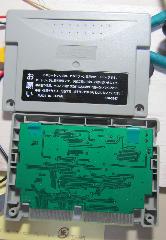
   razor85 Dec 30, 2018 

  cafe-alpha said:


Such a good idea to use the memory card, looks like it fits perfectly. I abandoned the idea of applying solder to the trail. The cartridge Just Works (TM) now.

About the low level stuff, working all the time with Israel Jacquez on libyaul and code using it

   cafe-alpha Jan 4, 2019 
All right, please keep up the good work ! Libyaul is good, please have fun with it

   razor85 Jan 4, 2019 
Will do, we plan lots of stuff! Anyone who wants to join the wagon, I'll be publishing my sources open, hopefully it will help others as well

   vbt Jan 6, 2019 

  razor85 said:

cool, what's in your bag ? can you share already your project ideas ?

   razor85 Jan 7, 2019 
Well, I have some game ideas:
1) (What I'm working on right now) A destruction racing game (similar to carmageddon, but top-down / iso view). I started this project on the Sega Genesis (but it was kinda of let down because I had to optimize it so much until I get it to be barely playable in the first iteractions), I can share some demo here later.
2) An Overcooked clone. I also started this one, have a few 3D models and stuff on progress, but its going to be secondary.
3) Whatever drives me interested in homebrews, definitely not emulation or porting anything, some creative work.

   Slaminger Mar 6, 2019 
Does anyone know of a method to add a usb port or SD card reader to the standard action replay plus 4m?

   cafe-alpha Nov 19, 2020 
I received some questions about USB dev cart, whose answers may interest other people interested in this project. So let's share them here.

Q1. What should be PCB thickness?
A1. 1.6mm, which is usually the default size when ordering the manufacturing of a PCB.

Q2. Have you any tutorial using the USB dev cart?
A2. No, but steps to install FTDI driver and to verify that the cartridge is working correctly can be found here : PPCenter :: Saturn Cartridges ...
Q3. Can I use ISO Flasher from antime to flash USB dev cart?
A3. Yes, but of course it requires something to boot from CD-R = swap trick, or modchip, or ODE.

Q4. Can it debug too?Right?
A4. If "debug" means to add breakpoints in source code like in modern development IDE then this is not available, but technically speaking this should be feasible.

   Hecato Nov 25, 2020 

  cafe-alpha said:

Thank you for your support. I have some other questions.

Q5. Is there an updated firmware than inside in Antime ISO?
Q6. So, when you say a debug support, Do you talking about the cart be a type of Serial COM port?
Q7. What should be necessary to add breakpoints support?

Regards


 Prev  1  ...  5  6  7  8  Next