
| Home | Forums | What's new | Resources | |
| Game Saves collect project |
| vbt - Jan 10, 2016 |
| Prev | 1 | ... | 5 | 6 | 7 | 8 | 9 | Next |
 |
paul_met | Oct 4, 2018 | ||
Nothing. I filled the blocks with random values from address 180000h to 1800A0h, but did not get the desired effect. At least Yabause does not react to this. | ||||

 |
cafe-alpha | Oct 5, 2018 | ||
There two different error codes for corrupted save on Saturn backup library : BUP_UNFORMAT and BUP_BROKEN. And it seems that corrupting the backup RAM signature throws BUP_UNFORMAT, so if you want to trigger BUP_BROKEN error while reading a save data, modifying save data allocation table and/or save data size should do the job as detailed in the screen copy below : 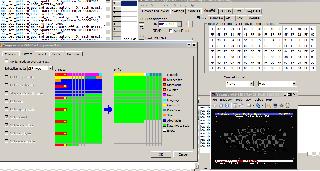 Here is the save data file used for testing : http://ppcenter.webou.net/divers/20181006_bup_brok... Acecssing the KAKYUSEI__2 file throws a BUP_BROKEN error code. | ||||

|
paul_met | Oct 7, 2018 | ||
Ok, here a save file for game Device Reign. | ||||
|
cafe-alpha | Oct 7, 2018 | |
| I changed the save data size and allocation table are set to nonsense values, so it should trigger an error when reading. It may take one day or two before I can test with the game, so if you are faster please keep me informed if it works or not. | |||
|
paul_met | Oct 8, 2018 | ||
Yes, the message about formatting the internal RAM is displayed, but only if you start the game on the SSF. For some reason this does not happen on the Yabause emulator - the game starts without any warnings. In this regard, I can not debug it. | ||||
|
cafe-alpha | Oct 12, 2018 | ||
I tried here too, but I only get a black screen on startup; I'm using a slightly modified version of yabause, which have probably worse compatibility than vanilla version however. Maybe you could try with forks of yabause (example : Kronos or Yaba Sanshiro), but since they usually don't memory editor or disassembler I guess theses are similar as SSF = "meh, what am I supposed to do with that ?" ... | ||||
|
paul_met | Oct 12, 2018 | ||
So, by comparing the memory dumps of the SSF emulators and Yabause, I found the values that are responsible for warning messages. I solved this problem. Thanks for the help. | ||||
 |
vbt | Dec 1, 2018 | ||
the link to your homepage is added to the first post | ||||
|
cafe-alpha | Dec 9, 2018 | ||
Thank you ! | ||||
|
paul_met | Feb 20, 2019 | |
| Does anyone have any saves for Tengai Maky: Daiyon no Mokushiroku - The Apocalypse IV? | |||
|
paul_met | Mar 14, 2020 | |
| Does anyone have complete save for Nanatsu Kaze no Shima Monogatari? | |||
 |
DamageX | Mar 14, 2020 | |
| I have saves for Tengai Makyou 4 http://www.hyakushiki.net/misc/teng-sav.7z ... | |||
|
paul_met | Mar 15, 2020 | ||
Oh, thanks, come in handy. | ||||
|
vbt | Jun 7, 2020 | |
some saves here :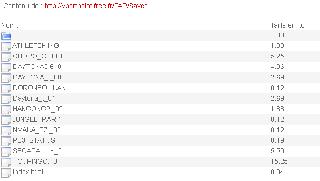 | |||
|
cafe-alpha | Jun 7, 2020 | |
| Thank you for the information ! Is it possible to add these saves in Save Data Manager ? Adding the saves there will make them available for everyone by using "Save Data Import" feature in SDM. | |||
|
vbt | Jun 16, 2020 | ||
yes you can add these saves to the SDM, i can't say how good they were. | ||||
| Prev | 1 | ... | 5 | 6 | 7 | 8 | 9 | Next |