
| Home | Forums | What's new | Resources | |
| GDMenu & OpenMenu HD Theme Manager (All-In-One Package) v1.31b |
| RazorX - Mar 17, 2020 |
| Prev | 1 | 2 | 3 | 4 | 5 | 6 | 7 | Next |
 |
RazorX | Mar 14, 2025 | ||
| RazorX updated GDMenu/OpenMenu HD Theme Manager (All-In-One Packa... with a new update entry: GDMenu HD Theme Manager (All-In-One Package)...
Read the rest of this update entry...... | ||||
|
RazorX | Aug 8, 2025 | ||
| RazorX updated GDMenu/OpenMenu HD Theme Manager (All-In-One Packa... with a new update entry: GDMenu HD Theme Manager (All-In-One Package)...
Read the rest of this update entry...... | ||||
|
RazorX | Aug 10, 2025 | ||
| RazorX updated GDMenu/OpenMenu HD Theme Manager (All-In-One Packa... with a new update entry: GDMenu HD Theme Manager (All-In-One Package)...
Read the rest of this update entry...... | ||||
|
RazorX | Aug 11, 2025 | |
| added three new simple themes: Covers Theme (PAL) 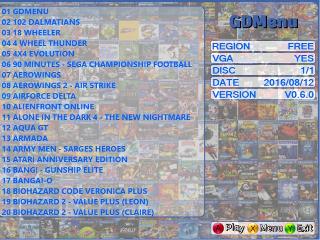 Covers Theme (USA)  Covers Theme (JAP)  | |||
|
RazorX | Aug 13, 2025 | ||
| RazorX updated GDMenu/OpenMenu HD Theme Manager (All-In-One Packa... with a new update entry: GDMenu HD Theme Manager (All-In-One Package)...
Read the rest of this update entry...... | ||||
|
RazorX | Aug 14, 2025 | ||
| RazorX updated GDMenu/OpenMenu HD Theme Manager (All-In-One Packa... with a new update entry: GDMenu HD Theme Manager (All-In-One Package)...
Read the rest of this update entry...... | ||||
|
RazorX | Aug 16, 2025 | ||
| RazorX updated GDMenu/OpenMenu HD Theme Manager (All-In-One Packa... with a new update entry: GDMenu HD Theme Manager (All-In-One Package)...
Read the rest of this update entry...... | ||||
|
RazorX | Nov 17, 2025 | ||
| RazorX updated GDMenu/OpenMenu HD Theme Manager (All-In-One Packa... with a new update entry: GDMenu HD Theme Manager (All-In-One Package)...
Read the rest of this update entry...... | ||||

 |
queenkjuul | Nov 20, 2025 | |
| No luck, unfortunately. Behavior on my Windows 11 machine is exactly the same - the message about already running. Weirdly, I tried my Windows 10 machine, and running "GDMenu HD Theme Manager.exe" results in a dialog box saying "Software is up to date" (just like running updater.exe) - but then nothing else happens, I click OK and the app never launches. | |||
|
RazorX | Nov 20, 2025 | ||
ok let me do a quick update | ||||
|
RazorX | Nov 20, 2025 | ||
| RazorX updated GDMenu/OpenMenu HD Theme Manager (All-In-One Packa... with a new update entry: GDMenu HD Theme Manager (All-In-One Package)...
Read the rest of this update entry...... | ||||
|
RazorX | Nov 20, 2025 | ||
try that, download the whole thing and replace everything | ||||
|
queenkjuul | Nov 20, 2025 | |
| nice, that has fixed things on my Windows 10 machine, I might not get a chance to test my Win 11 machine again until next week (guests arriving for the weekend tomorrow) but I will try it and get back to you, at least for now I have a workaround, thanks | |||
|
queenkjuul | Dec 1, 2025 | |
| looks like it's working on 11 too, thanks! | |||
|
RazorX | Dec 2, 2025 | ||
np | ||||
|
RazorX | Dec 24, 2025 | ||
| RazorX updated GDMenu/OpenMenu HD Theme Manager (All-In-One Packa... with a new update entry: GDMenu HD Theme Manager (All-In-One Package)...
Read the rest of this update entry...... | ||||
|
RazorX | Dec 30, 2025 | ||
| RazorX updated GDMenu/OpenMenu HD Theme Manager (All-In-One Packa... with a new update entry: GDMenu HD Theme Manager (All-In-One Package)...
Read the rest of this update entry...... | ||||
|
RazorX | Dec 30, 2025 | ||
| RazorX updated GDMenu/OpenMenu HD Theme Manager (All-In-One Packa... with a new update entry: GDMenu HD Theme Manager (All-In-One Package)...
Read the rest of this update entry...... | ||||
| Prev | 1 | 2 | 3 | 4 | 5 | 6 | 7 | Next |