
| Home | Forums | What's new | Resources | |
| Translating Grandia 1.1.1 |
| TrekkiesUnite118 - Sep 9, 2018 |
| Prev | 1 | ... | 16 | 17 | 18 | 19 | 20 | ... | 48 | Next |
 |
Mr Conan | Sep 8, 2019 | |
| Might be a variant of delta coding? | |||
 |
nanash1 | Sep 15, 2019 | |
My compression is working. To demonstrate I made a video to show my friend. Now all I need to do is make the command line interface and documentation. Then I'll publish it here.
| |||


|
nanash1 | Sep 15, 2019 | |
| Here is the initial version of my graphics compression tool. It's currently only tested for the battle screen graphics and nothing else. Known issues are that XOR compression mode is not supported and that the look up table for the compression function is currently hard coded. That might be a problem when trying to re-compress other graphics. Please report all problems that you find. I'll probably release the source some time later, after cleaning it up a bit. Edit: I forgot to mention in the readme that the offsets were tested on the Digital Museum disc. The offsets may be different for the other discs. | |||
|
nanash1 | Sep 15, 2019 | |
| The offsets for disk 1 are: 0x1003218 for the compressed data, 0x7a0108e for the table in case anyone is wondering. I'll add these to the readme for the next version. | |||
 |
TrekkiesUnite118 | Sep 15, 2019 | ||
Did a quick test and it seems to be working so far: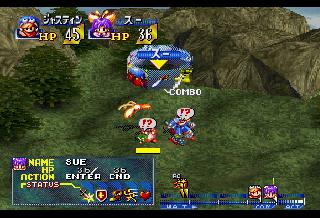 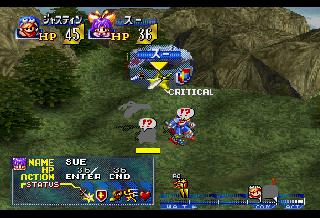 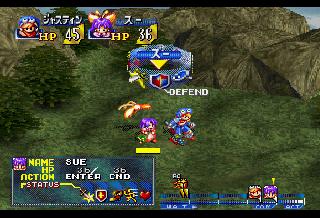 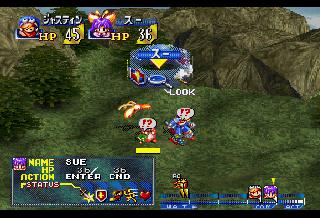 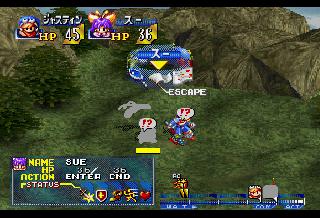 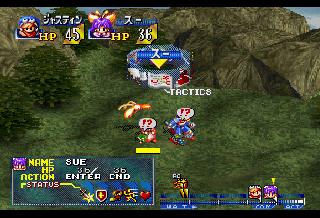 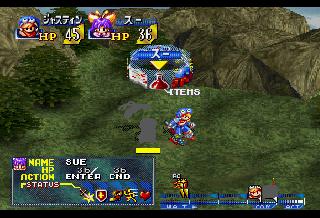 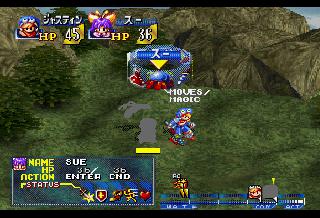
Actually I think the table is in a different spot. I found it offset 0x19660474, which corresponds to being in the GMOVE.BIN file, which is where the decompression code lives. So that makes more sense I think. | ||||
|
nanash1 | Sep 15, 2019 | ||
I tested these offsets and they worked. I guess there are multiple files using the same table, that's why the same table is found multiple times on the CD. | ||||
|
TrekkiesUnite118 | Sep 15, 2019 | |
| So where did you find the tile properties? I'd like to take a look at that and see what I can do to expand it for the few areas that will be necessary. | |||
|
nanash1 | Sep 15, 2019 | ||
Here is the relevant excerpt... from my investigation.... All offsets are for the Digital Museum Disc iso.
| ||||
|
nanash1 | Sep 16, 2019 | |
| I took a look at the tiles of the battle results screen. They're compressed by the same function but with a different compression mode. This mode isn't differential and just reads the values directly from the look up table. Adjusting the decompression function was easy, but now I'll need change the compression function to use this mode and to support different tables. | |||
|
TrekkiesUnite118 | Sep 16, 2019 | |||||
| So I think I have this kind of figured out for some of the tiles. It seems we can have either 0x14 bytes or 0x12 bytes of data for this data, but overall the format seems to follow this general format: Code:
These 0x12 bytes represent the properties for the texture that displays the word "Moves" in the "Moves and Magic" menu. The bytes break down as follows: Code:
So with this information I should be able to rework some of the more troublesome text icons to get more space to fit the English words. | |||||||
|
nanash1 | Sep 16, 2019 | |
| Maybe the size of a properties block has something to do with the type of sprite it represents. I know that some are scaled sprites and some are distorted sprites on the battle screen. | |||
 |
Jackafur | Sep 17, 2019 | |
| So I mod chipped my saturn and patched my own copy of the game and i still have no battle sprites. so as far as i can tell pseudo saturn kai wasnt at fault and my model 1 is just having issues. guess im replacing my saturn. i made a slight adjustment on the laser pot to which didnt do anything. | |||
|
TrekkiesUnite118 | Sep 17, 2019 | ||
For sanity, how does the original Japanese disc behave? | ||||
 |
Ardiloso | Sep 17, 2019 | ||
Do another clean rip of your original disc at the lowest speed possible. Maybe the problem is with your iso. Also, try another CDR. | ||||
|
Jackafur | Sep 17, 2019 | |||||
yea the retail copy of the game does the same thing unfortunately. If I get another saturn i'll report back but for now it just seems its just my old model 1 saturn acting up. i hooked up a multimeter to the rf and ground on the optical drive and the voltages seemed pretty reasonable. 3.18 with the game running.
thanks for the suggestion but ive tried 2 different drives at their slowest speeds on 2 different kinds of media including jvc silvers. also like i mentioned it looks like a retail version of the game acts the same on my saturn. | |||||||
| Prev | 1 | ... | 16 | 17 | 18 | 19 | 20 | ... | 48 | Next |