
| Home | Forums | What's new | Resources | |
| Translating Grandia 1.1.1 |
| TrekkiesUnite118 - Sep 9, 2018 |
| Prev | 1 | ... | 8 | 9 | 10 | 11 | 12 | ... | 48 | Next |
 |
Ardiloso | May 24, 2019 | ||
Beautiful. Can't wait to resume playing tonight with a newer burned disc. | ||||


 |
TrekkiesUnite118 | May 30, 2019 | ||
Does Rhea have the ability to backup save files to an SD card? If so send me your save file and I can try testing it myself and see if I can reproduce it. Otherwise do as others have done and provide screenshot of the map and scenario flags using the debug disc so I can try and create a save file close to it. Since RetroDadModernLad didn't report this I'm rather curious if this is something new or an odd bug that doesn't always happen. | ||||
 |
nanash1 | May 31, 2019 | |||
Sadly there is no save game backup feature as far as I know. I made screenshots of the debug screens:
Edit: I noticed that the scene glitches differently and a bit earlier with the debug version. With the debug version the glitches start immediately when the cut scene starts with Mullen and Leen entering the room. Before it only became apparent after the teleportation (the beginning of my earlier video) | |||||

|
nanash1 | May 31, 2019 | |||||
| I don't know if this is helpful, but I made a comparison of how the scene plays for me on the unpatched Japanese version, the lastest patched version and the latest debug enabled version: Original:
Patched:
Patched and debug enabled:
| |||||||
|
TrekkiesUnite118 | Jun 1, 2019 | |
| So I have a save file near it, but it seems to be an inconsistent bug. Sometimes I've gotten it to happen, other times it's played out fine. However it seems that the root cause may be the camera getting stuck and then bugging out with it's movements. I'll look into the control codes for that script in detail and see what I can find out. | |||
 |
msimplay | Jun 4, 2019 | ||
I'm thinking maybe even the original had bugs that are being fixed along the way | ||||
|
nanash1 | Jun 4, 2019 | |
| I don't think it's a bug in the original game. I've played this cutscene about 6 or 7 times and it always glitches the same way for me on the patched version. The Japanese Version on the other hand never glitched once with the same save game. | |||
|
TrekkiesUnite118 | Jun 4, 2019 | ||
It's a bug that makes zero sense though as the control codes in the script for that sequence are identical. And it's not related to any ASM changes that have been made as the sequence plays out fine when the Japanese script is swapped back in. | ||||
|
TrekkiesUnite118 | Jun 5, 2019 | |
| Ok, I think I have something that works. I ended up disabling one of the more subtle camera movements in that sequence and it seems to have fixed the erratic camera behavior. I'm not happy with the change though as there's no reason that should have been necessary, but I can't really find any other reason for why it's behaving that way. Attached is a patch with the change. This also includes a synchronization fix for Nana, Saki, and Mio's introduction at the Sult Ruins. | |||
|
nanash1 | Jun 5, 2019 | |
| Thanks for your effort. The scene now plays correctly for me and I can't tell which camera movement was removed. Imo the fix is fine. It seems to be a bug in the original code after all. It just isn't triggered in the Japanese version. I've finished CD1 and I found no further problems. | |||
 |
Tapper | Jun 14, 2019 | |
| New here. Just wanna say thank you for doing this translation. I've always wanted to play the Saturn version in English, and this is working great (using Beetle Saturn in RetroArch). I don't currently own a Saturn, sold it years ago, but often miss it. Great system. Kept some of the games though, glad I did, in case I buy one again. | |||
 |
Dalton2K5 | Jun 19, 2019 | |
| Hey, new here as well. Just saying I'm loving the translation patch so far. I can't do much on the coding side to help out, but I believe uploading some US Sega Saturn Grandia case inserts/manual back-front will help out a lot of people who want to use this on their real Saturn like I do, and want to have it fit right along with the time appropriate (1998) Sega Saturn games out there at the time Grandia would have presumably come out in the west. No plans on CD artwork, but I can make it if anyone is interested. 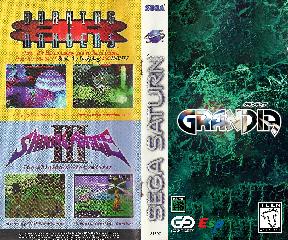 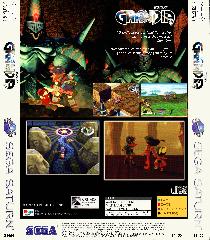 | |||
|
Ardiloso | Jun 19, 2019 | |
| Great work @Dalton2K5... your cover looks amazing, I will make a good use. | |||
 |
Neuma7 | Jun 25, 2019 | |
| Can someone message me on how I get it to work on the real Saturn? I did everything right and I burned the iso to a cd and it wont play without crashing. Do I have to convert the patched iso file back to a bin file in order for it to work on real hardware? | |||
|
TrekkiesUnite118 | Jun 25, 2019 | ||
Define crashing. It's most likely the quality of media you are using. Grandia is very picky about this and cheap CD-Rs wont cut it. | ||||
|
Ardiloso | Jun 26, 2019 | ||
Make your own rip. You need a clean rip for Grandia and to be sure make yours from your disc, don't download it from anywhere. Burn in a good quality CDR in the lowest possible speed. Grandia constantly streams data/audio/video from disc and a bad quality/burned disc will not run properly. | ||||
 |
Pearl Jammzz | Jun 26, 2019 | |
| I'm old here but I logged in just to say thank you! This looks great! | |||
|
Neuma7 | Jun 26, 2019 | ||
The game boots up fine and then as soon as I hit start at the menu screen it freezes immediately every time. | ||||
| Prev | 1 | ... | 8 | 9 | 10 | 11 | 12 | ... | 48 | Next |